Ray Train: validation data, run config and results
Two workers train with a train and a validation dataset, a train_loop_config dict and a RunConfig; result nodes pull the final metrics and the run directory out of the Result.
When to use it. A realistic training job skeleton: hyperparameters passed in, checkpoints kept under a storage path, metrics read back afterwards.
The picture below is the graph drawn in Eugo's visual Ray builder, and the cell under Generated code is the Ray code the builder produced from it. The code is plain Ray: it runs without the builder.
Back to the gallery · Tested with Ray 2.55.1
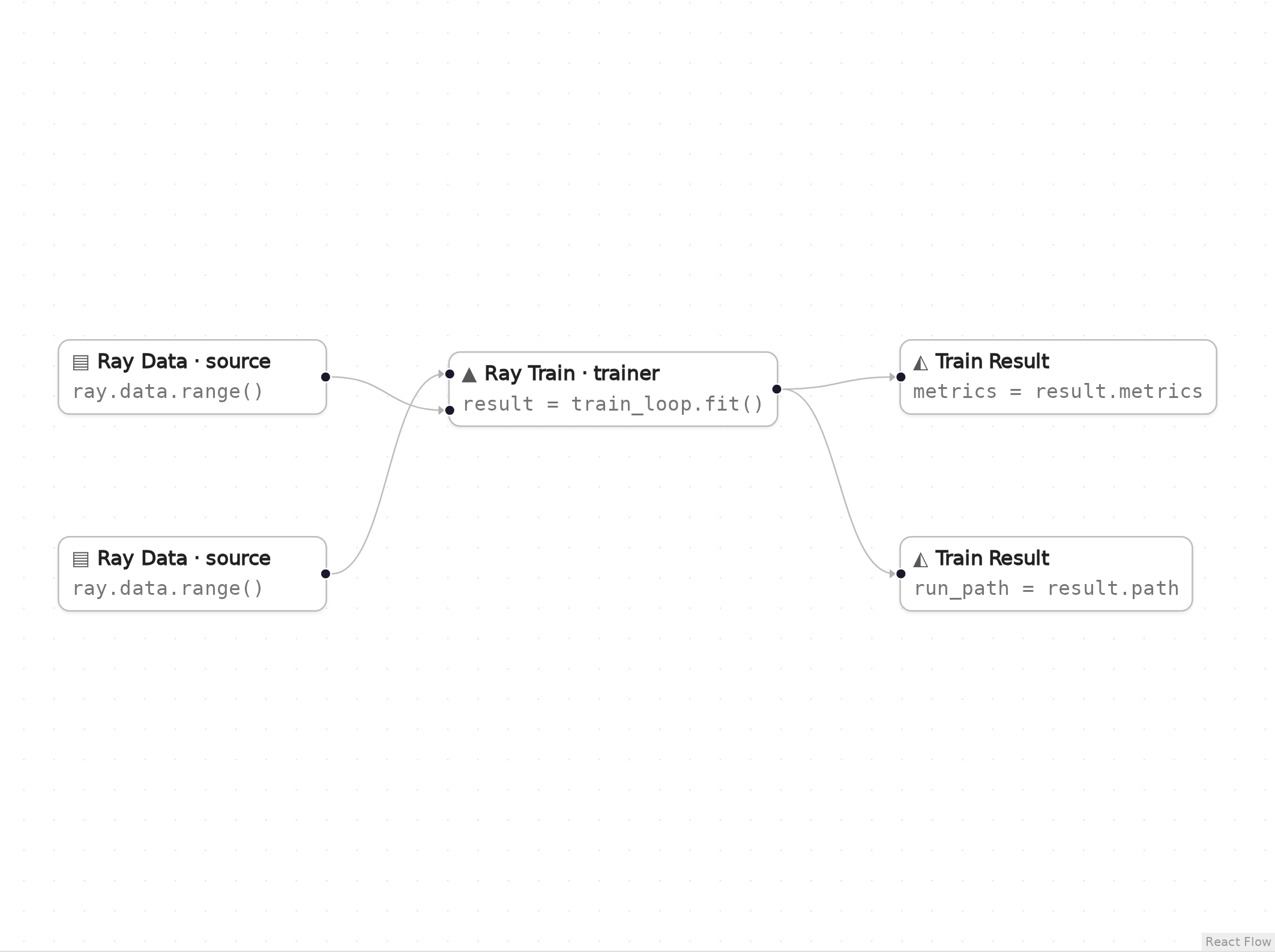
The graph in Eugo's visual Ray builder. Both sources show ray.data.range(). The upper one is the 80-row training dataset (n1, passed as "train") and the lower one is the 20-row validation dataset (n2, passed as "val"). Their edges cross on the way into the trainer.
Setup
Start a local Ray instance. The options keep the notebook quiet: no dashboard, and worker logs stay out of the notebook. Ray is capped at four CPUs so the example behaves the same on any machine. The generated code below only calls ray.init() when Ray is not running yet, so it reuses this instance.
import ray
ray.init(include_dashboard=False, log_to_driver=False, logging_level="ERROR", num_cpus=4)
RayContext(dashboard_url='', python_version='3.12.3', ray_version='2.55.1', ray_commit='237c2455ebb1ea15a32dd9e1fdeb2d617badc37f')
User functions
The nodes in the graph call these ordinary Python functions and classes. In the builder you write them in a normal notebook cell, and the generated code refers to them by name.
import json
import os
import tempfile

import ray


def train_loop(config):
    # Runs on each of the two workers; config is the train_loop_config dict.
    train_rows = sum(len(b["id"]) for b in ray.train.get_dataset_shard("train").iter_batches(batch_size=8))
    val_rows = sum(len(b["id"]) for b in ray.train.get_dataset_shard("val").iter_batches(batch_size=8))
    for epoch in range(config["epochs"]):
        metrics = {"epoch": epoch, "lr": config["lr"], "train_rows": train_rows, "val_rows": val_rows}
        with tempfile.TemporaryDirectory() as tmp:
            checkpoint = None
            if ray.train.get_context().get_world_rank() == 0:
                # Only the first worker saves state; every worker still calls report().
                with open(os.path.join(tmp, "state.json"), "w") as f:
                    json.dump(metrics, f)
                checkpoint = ray.train.Checkpoint.from_directory(tmp)
            ray.train.report(metrics, checkpoint=checkpoint)
Generated code
This is the cell the visual builder generated from the graph above.
# Generated with Eugo's visual Ray builder

import ray
from ray.train import CheckpointConfig, RunConfig, ScalingConfig
from ray.train.torch import TorchTrainer

if not ray.is_initialized():
    ray.init()

ds_n1 = ray.data.range(80)
ds_n2 = ray.data.range(20)

_trainer_n3 = TorchTrainer(train_loop, train_loop_config={"epochs": 2, "lr": 0.1}, scaling_config=ScalingConfig(num_workers=2, use_gpu=False), run_config=RunConfig(storage_path="/tmp/ray_patterns_train", name="with_validation", checkpoint_config=CheckpointConfig(num_to_keep=1)), datasets={"train": ds_n1, "val": ds_n2})
_result_n3 = _trainer_n3.fit()
metrics = _result_n3.metrics
run_path = _result_n3.path
Check the result
The cell below checks that the generated code did what the graph describes.
import shutil

assert metrics["epoch"] == 1 and metrics["lr"] == 0.1, metrics
assert run_path.startswith("/tmp/ray_patterns_train"), run_path
print("metrics:", metrics)
print("run directory:", run_path)
shutil.rmtree("/tmp/ray_patterns_train", ignore_errors=True)
metrics: {'epoch': 1, 'lr': 0.1, 'train_rows': 40, 'val_rows': 10}
run directory: /tmp/ray_patterns_train/with_validation
How the graph maps to the code
Each step names a node in the picture by its label, the lines of the generated cell it produced, and what those lines do. Node ids such as n1 are not drawn on the canvas. Where the builder names a variable after a node, the id is its suffix (for example _trainer_n3).
Setup (lines 1, 3–5 and 7–8)
# Generated with Eugo's visual Ray builder
...
import ray
from ray.train import CheckpointConfig, RunConfig, ScalingConfig
from ray.train.torch import TorchTrainer
...
if not ray.is_initialized():
    ray.init()
The first line marks the cell as generated. The builder then adds an import for every Ray API the graph uses and a guarded ray.init(), so re-running the cell reuses the running cluster.
Source (node n1, line 10)
ds_n1 = ray.data.range(80)
The training dataset (80 rows), split across the two workers.
Source (node n2, line 11)
ds_n2 = ray.data.range(20)
The validation dataset, wired into the trainer's val input; workers read it with get_dataset_shard("val").
Trainer (node n3, lines 13–14)
_trainer_n3 = TorchTrainer(train_loop, train_loop_config={"epochs": 2, "lr": 0.1}, scaling_config=ScalingConfig(num_workers=2, use_gpu=False), run_config=RunConfig(storage_path="/tmp/ray_patterns_train", name="with_validation", checkpoint_config=CheckpointConfig(num_to_keep=1)), datasets={"train": ds_n1, "val": ds_n2})
_result_n3 = _trainer_n3.fit()
train_loop_config is passed to train_loop as config; RunConfig sets the storage path, run name and checkpoint retention.
Train result (node x1, line 15)
metrics = _result_n3.metrics
Result.metrics: the metrics reported with the latest checkpoint.
Train result (node x2, line 16)
run_path = _result_n3.path
Result.path: where this run's files were written.
Clean up
Shut down Ray, so the next notebook starts fresh.
ray.shutdown()