One program across Core, Data, Train and Tune
A Core task, a Data pipeline, a standalone Train run and a Tune sweep in one graph; the builder emits them in that order as one program.
When to use it. End-to-end experiments: prepare inputs, build features, train a baseline and sweep around it in a single notebook.
The picture below is the graph drawn in Eugo's visual Ray builder, and the cell under Generated code is the Ray code the builder produced from it. The code is plain Ray: it runs without the builder.
Back to the gallery · Tested with Ray 2.55.1
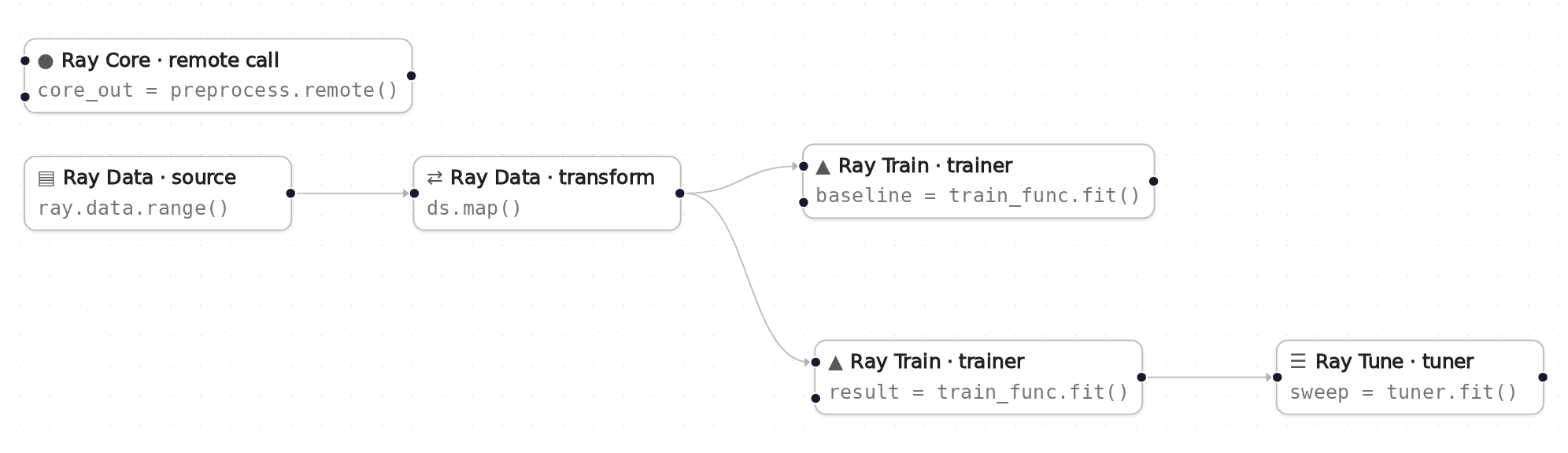
The graph in Eugo's visual Ray builder.
Setup
Start a local Ray instance. The options keep the notebook quiet: no dashboard, and worker logs stay out of the notebook. Ray is capped at four CPUs so the example behaves the same on any machine. The generated code below only calls ray.init() when Ray is not running yet, so it reuses this instance.
import ray
ray.init(include_dashboard=False, log_to_driver=False, logging_level="ERROR", num_cpus=4)
RayContext(dashboard_url='', python_version='3.12.3', ray_version='2.55.1', ray_commit='237c2455ebb1ea15a32dd9e1fdeb2d617badc37f')
User functions
The nodes in the graph call these ordinary Python functions and classes. In the builder you write them in a normal notebook cell, and the generated code refers to them by name.
import ray


def preprocess():
    return "inputs ready"


def add_label(row):
    row["label"] = row["id"] % 2
    return row


def train_func(config=None):
    lr = (config or {}).get("lr", 0.05)
    rows = sum(len(b["id"]) for b in ray.train.get_dataset_shard("train").iter_batches(batch_size=4))
    for i in range(3):
        ray.train.report({"loss": lr / (i + 1), "rows": rows})
Generated code
This is the cell the visual builder generated from the graph above.
# Generated with Eugo's visual Ray builder

from ray import tune
import ray
from ray.train import RunConfig, ScalingConfig
from ray.train.torch import TorchTrainer
from ray.tune import TuneConfig, Tuner
from ray.tune.integration.ray_train import TuneReportCallback

if not ray.is_initialized():
    ray.init()

_n0 = ray.remote(preprocess).remote()
core_out = ray.get(_n0)

ds_n1 = ray.data.range(16)
ds_n2 = ds_n1.map(add_label)

_trainer_n4 = TorchTrainer(train_func, scaling_config=ScalingConfig(num_workers=1, use_gpu=False), datasets={"train": ds_n2})
baseline = _trainer_n4.fit()

def _tune_driver_n6(config):
    trainer = TorchTrainer(train_func, train_loop_config=config["train_loop_config"], scaling_config=ScalingConfig(num_workers=1, use_gpu=False), datasets={"train": ds_n2}, run_config=RunConfig(callbacks=[TuneReportCallback()]))
    trainer.fit()

_tuner_n6 = Tuner(_tune_driver_n6, param_space={"train_loop_config": {"lr": tune.grid_search([0.01, 0.1])}}, tune_config=TuneConfig(num_samples=1, metric="loss", mode="min", max_concurrent_trials=1))
sweep = _tuner_n6.fit()
best = sweep.get_best_result()
Check the result
The cell below checks that the generated code did what the graph describes.
assert core_out == "inputs ready", core_out
assert baseline.error is None, baseline.error
assert len(sweep) == 2 and sweep.num_errors == 0, sweep.errors
print("baseline trained without errors")
print("best lr:", best.config["train_loop_config"]["lr"])
baseline trained without errors
best lr: 0.01
How the graph maps to the code
Each step names a node in the picture, the lines of the generated cell it produced, and what those lines do. The node id (for example n1) is also the suffix of the variable that holds the node's result.
Setup (lines 1, 3–8 and 10–11)
# Generated with Eugo's visual Ray builder
...
from ray import tune
import ray
from ray.train import RunConfig, ScalingConfig
from ray.train.torch import TorchTrainer
from ray.tune import TuneConfig, Tuner
from ray.tune.integration.ray_train import TuneReportCallback
...
if not ray.is_initialized():
    ray.init()
The first line marks the cell as generated. The builder then adds an import for every Ray API the graph uses and a guarded ray.init(), so re-running the cell reuses the running cluster.
Remote task (node n0, lines 13–14)
_n0 = ray.remote(preprocess).remote()
core_out = ray.get(_n0)
A Core task that runs first.
Source (node n1, line 16)
ds_n1 = ray.data.range(16)
The Data source.
Transform (node n2, line 17)
ds_n2 = ds_n1.map(add_label)
map(add_label) adds a label column; its output feeds both trainers.
Trainer (node n4, lines 19–20)
_trainer_n4 = TorchTrainer(train_func, scaling_config=ScalingConfig(num_workers=1, use_gpu=False), datasets={"train": ds_n2})
baseline = _trainer_n4.fit()
A standalone baseline training run.
Tuner (node n6, lines 22, 24 and 26–28)
def _tune_driver_n6(config):
...
    trainer.fit()
...
_tuner_n6 = Tuner(_tune_driver_n6, param_space={"train_loop_config": {"lr": tune.grid_search([0.01, 0.1])}}, tune_config=TuneConfig(num_samples=1, metric="loss", mode="min", max_concurrent_trials=1))
sweep = _tuner_n6.fit()
best = sweep.get_best_result()
A two-point grid search over lr.
Trainer (node n5, line 23)
trainer = TorchTrainer(train_func, train_loop_config=config["train_loop_config"], scaling_config=ScalingConfig(num_workers=1, use_gpu=False), datasets={"train": ds_n2}, run_config=RunConfig(callbacks=[TuneReportCallback()]))
The trainer the Tuner sweeps; the builder moves it into the per-trial driver function.
Other ways the builder can emit this graph
The builder can emit the same graph in other forms. They are shown here as text and are not run by this notebook.
As a standalone script (core_data_train_tune.py)
The builder can export the graph as a Python module: the user functions are copied in and the Ray calls go under if __name__ == "__main__":. It was run as a script on Ray 2.55.1. The builder also writes a comment block of its own export notes at the top of the file; it is left out here.
# Generated with Eugo's visual Ray builder

from ray import tune
import ray
from ray.train import RunConfig, ScalingConfig
from ray.train.torch import TorchTrainer
from ray.tune import TuneConfig, Tuner
from ray.tune.integration.ray_train import TuneReportCallback

import ray


def preprocess():
    return "inputs ready"


def add_label(row):
    row["label"] = row["id"] % 2
    return row


def train_func(config=None):
    lr = (config or {}).get("lr", 0.05)
    rows = sum(len(b["id"]) for b in ray.train.get_dataset_shard("train").iter_batches(batch_size=4))
    for i in range(3):
        ray.train.report({"loss": lr / (i + 1), "rows": rows})

if __name__ == "__main__":
    ray.init()

    _n0 = ray.remote(preprocess).remote()
    core_out = ray.get(_n0)

    ds_n1 = ray.data.range(16)
    ds_n2 = ds_n1.map(add_label)

    _trainer_n4 = TorchTrainer(train_func, scaling_config=ScalingConfig(num_workers=1, use_gpu=False), datasets={"train": ds_n2})
    baseline = _trainer_n4.fit()

    def _tune_driver_n6(config):
        trainer = TorchTrainer(train_func, train_loop_config=config["train_loop_config"], scaling_config=ScalingConfig(num_workers=1, use_gpu=False), datasets={"train": ds_n2}, run_config=RunConfig(callbacks=[TuneReportCallback()]))
        trainer.fit()

    _tuner_n6 = Tuner(_tune_driver_n6, param_space={"train_loop_config": {"lr": tune.grid_search([0.01, 0.1])}}, tune_config=TuneConfig(num_samples=1, metric="loss", mode="min", max_concurrent_trials=1))
    sweep = _tuner_n6.fit()
    best = sweep.get_best_result()
    ray.shutdown()
Clean up
Shut down Ray, so the next notebook starts fresh.
ray.shutdown()