Reserve resources with a placement group
A placement group reserves two one-CPU bundles. Each task is pinned to a bundle, and the group is removed at the end.
When to use it. Gang scheduling: work that only makes sense when all its pieces get resources together, or that must be packed onto (or spread across) nodes.
The picture below is the graph drawn in Eugo's visual Ray builder, and the cell under Generated code is the Ray code the builder produced from it, edited by hand so that each function is wrapped with ray.remote once (the cell's first line says so). The code is plain Ray: it runs without the builder.
Back to the gallery · Tested with Ray 2.55.1
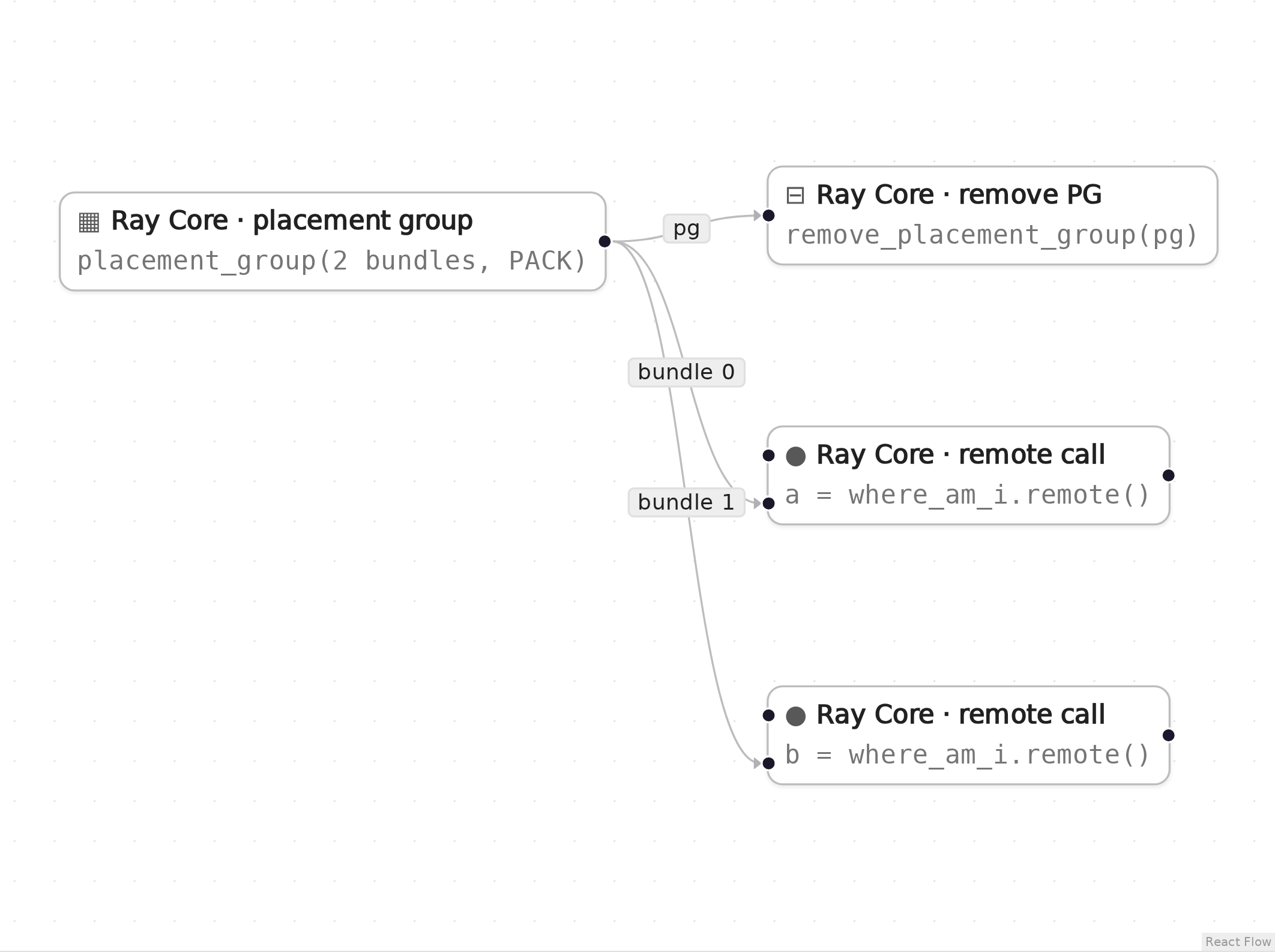
The graph in Eugo's visual Ray builder. a (node n1) runs in bundle 0 and b (node n2) in bundle 1. The bundle 1 label belongs to the longer edge that goes to b, although it sits next to the input of a.
Setup
Start a local Ray instance. The options keep the notebook quiet: no dashboard, and worker logs stay out of the notebook. Ray is capped at four CPUs so the example behaves the same on any machine. The generated code below only calls ray.init() when Ray is not running yet, so it reuses this instance.
import ray
ray.init(include_dashboard=False, log_to_driver=False, logging_level="ERROR", num_cpus=4)
RayContext(dashboard_url='', python_version='3.12.3', ray_version='2.55.1', ray_commit='237c2455ebb1ea15a32dd9e1fdeb2d617badc37f')
User functions
The nodes in the graph call these ordinary Python functions and classes. In the builder you write them in a normal notebook cell, and the generated code refers to them by name.
import ray


def where_am_i(tag):
    pg_id = ray.get_runtime_context().get_placement_group_id()
    return f"{tag} ran in placement group {pg_id[:8]}"
Generated code
This is the cell the visual builder generated from the graph above, with one edit by hand. The builder wrote ray.remote(where_am_i) at both task calls, and every ray.remote(...) call makes a new remote function that Ray exports to the cluster again; Ray's documentation lists this as an anti-pattern (Redefining the same remote function or class harms performance). The cell below wraps where_am_i once and reuses it.
# Generated with Eugo's visual Ray builder, then edited by hand: each function is wrapped with ray.remote once

import ray
from ray.util.placement_group import placement_group, remove_placement_group
from ray.util.scheduling_strategies import PlacementGroupSchedulingStrategy

if not ray.is_initialized():
    ray.init()

where_am_i_task = ray.remote(where_am_i)

_pg_pg1 = placement_group(bundles=[{"CPU": 1}, {"CPU": 1}], strategy="PACK")
ray.get(_pg_pg1.ready())
_n1 = where_am_i_task.options(scheduling_strategy=PlacementGroupSchedulingStrategy(placement_group=_pg_pg1, placement_group_bundle_index=0)).remote("task-0")
a = ray.get(_n1)
_n2 = where_am_i_task.options(scheduling_strategy=PlacementGroupSchedulingStrategy(placement_group=_pg_pg1, placement_group_bundle_index=1)).remote("task-1")
b = ray.get(_n2)
remove_placement_group(_pg_pg1)
Check the result
The cell below checks that the generated code did what the graph describes.
import time

from ray.util import placement_group_table

assert a.startswith("task-0 ran in placement group"), a
assert b.startswith("task-1 ran in placement group"), b
for _ in range(100):
    if placement_group_table(_pg_pg1)["state"] == "REMOVED":
        break
    time.sleep(0.1)
else:
    raise AssertionError(placement_group_table(_pg_pg1)["state"])
print(a)
print(b)
task-0 ran in placement group 440e279c
task-1 ran in placement group 440e279c
How the graph maps to the code
Each step names a node in the picture, the lines of the generated cell it produced, and what those lines do. The node id (for example n1) is also the suffix of the variable that holds the node's result.
Setup (lines 1, 3–5 and 7–8)
# Generated with Eugo's visual Ray builder, then edited by hand: each function is wrapped with ray.remote once
...
import ray
from ray.util.placement_group import placement_group, remove_placement_group
from ray.util.scheduling_strategies import PlacementGroupSchedulingStrategy
...
if not ray.is_initialized():
    ray.init()
The first line marks the cell as generated and names the edit made by hand. The builder then adds an import for every Ray API the graph uses and a guarded ray.init(), so re-running the cell reuses the running cluster.
Remote function (line 10, edited by hand)
where_am_i_task = ray.remote(where_am_i)
ray.remote turns the plain function into a remote function, once. Both task nodes below call .options() on it to pick their bundle; .options() applies to that one call, so a single remote function serves both.
Placement group (node pg1, lines 12–13)
_pg_pg1 = placement_group(bundles=[{"CPU": 1}, {"CPU": 1}], strategy="PACK")
ray.get(_pg_pg1.ready())
placement_group reserves two bundles of one CPU each with the PACK strategy (as few nodes as possible); ray.get(pg.ready()) waits until the reservation holds.
Remote task (node n1, lines 14–15)
_n1 = where_am_i_task.options(scheduling_strategy=PlacementGroupSchedulingStrategy(placement_group=_pg_pg1, placement_group_bundle_index=0)).remote("task-0")
a = ray.get(_n1)
PlacementGroupSchedulingStrategy with placement_group_bundle_index=0 pins this task to the first bundle.
Remote task (node n2, lines 16–17)
_n2 = where_am_i_task.options(scheduling_strategy=PlacementGroupSchedulingStrategy(placement_group=_pg_pg1, placement_group_bundle_index=1)).remote("task-1")
b = ray.get(_n2)
The second task is pinned to bundle 1.
Remove PG (node r1, line 18)
remove_placement_group(_pg_pg1)
remove_placement_group releases the reserved resources.
Clean up
Shut down Ray, so the next notebook starts fresh.
ray.shutdown()